Why Quiz Websites Need More Than Questions and Scores
Quiz websites are fun because they are quick, simple, and easy to use. A visitor answers a few questions, gets a score, and instantly knows how they did.
Maybe they feel proud. Maybe they feel surprised. Maybe they say, “Wait, how did I miss that?”
But here is the bigger question: what happens next?
If a quiz website only shows questions and scores, the experience can end too quickly. A user may know they scored 7 out of 10, but they may not understand why they missed the other three questions. They may enjoy the challenge, but leave without learning much.
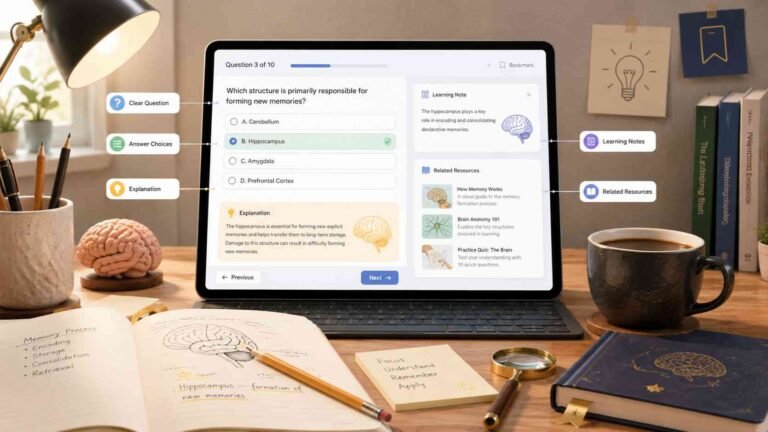
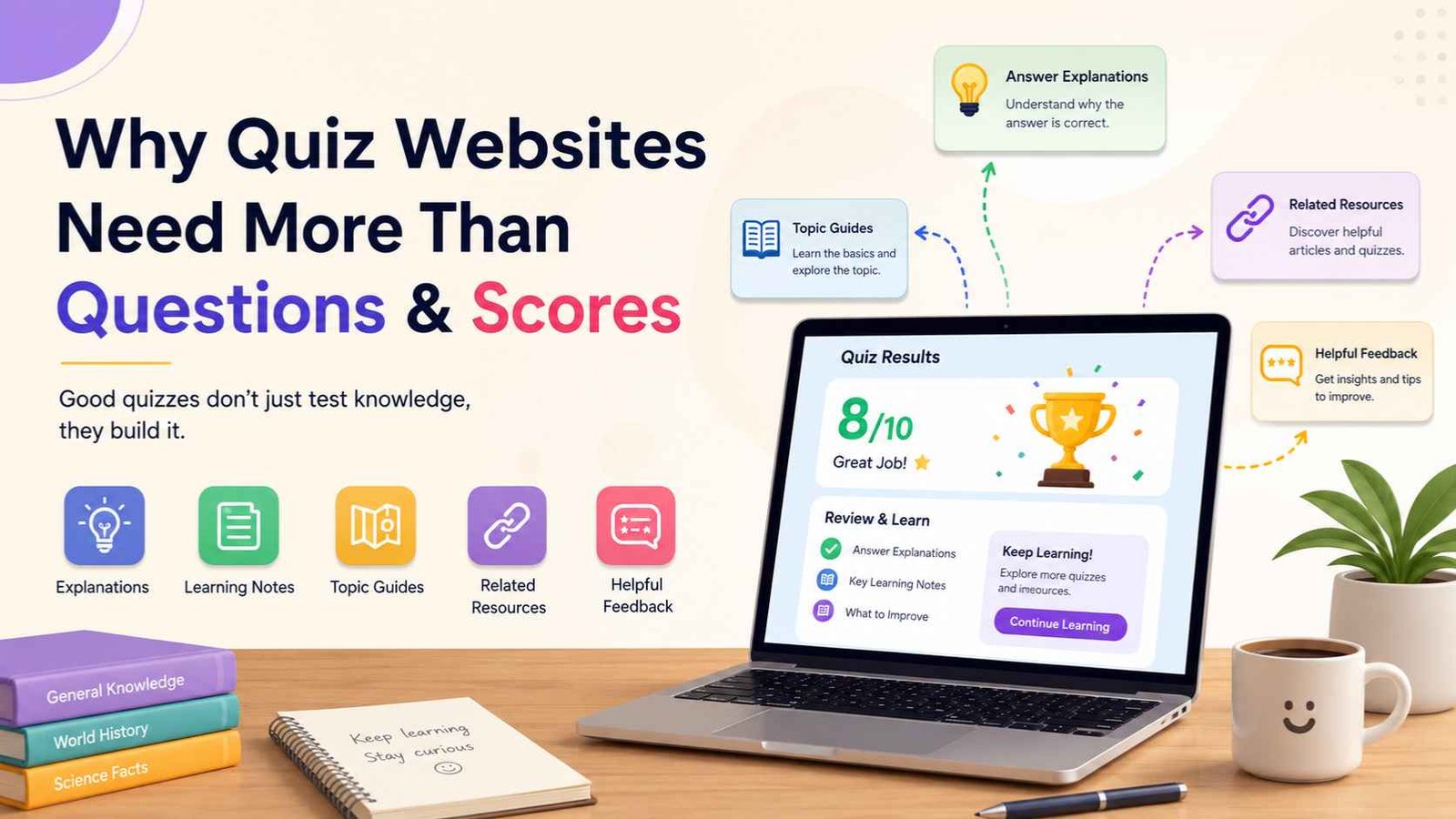
That is why the best quiz websites need more than correct answers and final scores. They need answer explanations, learning notes, topic guides, related resources, and helpful feedback that turns a short quiz into a stronger learning experience.
Questions and scores are useful. But when paired with context, they become much more powerful.
Why Questions and Scores Are Not Enough
📊 A Score Shows Results
A quiz score tells users how many answers they got right. That is useful, but it only gives the final number.
🔍 Explanations Show Why
Answer explanations help users understand the reason behind the correct answer, which makes the quiz more educational.
🧩 Context Builds Memory
Facts are easier to remember when they connect to a story, example, image, location, or related idea.
For example, imagine a user takes a geography quiz and scores 6 out of 10. The score tells them they missed four questions, but it does not explain:
- Why the correct answers were correct
- What topic they should review
- Whether they made a careless mistake
- Which facts they almost remembered
- How the question connects to general knowledge
A Better Quiz Website Helps Before, During, and After the Quiz
A helpful quiz website does not only focus on the moment when users click an answer. It supports the full learning journey.
Before the Quiz: Prepare the Reader
Before users start, give them a short introduction. Tell them what the quiz is about and what they may learn.
Example: “This science quiz will test your knowledge of planets, weather, animals, and simple everyday facts.”
During the Quiz: Keep It Clear
Good quiz questions should be easy to read. The answer choices should be fair, clear, and not confusing just for the sake of being tricky.
A quiz should feel like a friendly challenge, not a stressful exam.
After the Quiz: Turn Scores Into Learning
Instead of only saying “You scored 7/10,” give users direction.
Example: “You have a strong basic understanding, but you may want to review world capitals and major rivers.”
During the Quiz: Make the Experience Clear and Useful
A quiz website should avoid making users feel lost. Clear design matters. Simple instructions matter. Mobile-friendly pages matter.
Helpful quiz features include:
After the Quiz: Turn the Score Into Learning
This is where many quiz websites miss the biggest opportunity. The score should not be the final stop. It should be the beginning of review.
Add Answer Explanations
Answer explanations are one of the most important parts of educational quizzes. A simple explanation can turn a missed question into a memorable fact.
Question: Which planet is known as the Red Planet?
Answer: Mars
Explanation: Mars is called the Red Planet because iron-rich dust on its surface gives it a reddish color.
Include Learning Notes
Learning notes are short extra details that add context. They can appear after the answer or at the end of the quiz. One quiz question can open the door to more knowledge when the page gives users something useful to remember.
Why Context Helps Memory
People do not remember facts well when they feel isolated. A fact becomes easier to remember when it connects to something else.
That is why quiz learning works better with explanations. The question catches attention. The answer gives feedback. The explanation creates a mental connection.
For example, a user may forget that the Nile is often called the longest river in the world. But if the explanation says it flows through northeastern Africa and was central to ancient Egyptian civilization, the fact becomes easier to picture.
Context makes knowledge stick.
Related Resources Keep Curiosity Alive
A user who finishes a quiz may want to learn more. Do not let that curiosity disappear. A smart quiz page can guide readers to the next helpful step.
Helpful Feedback Makes Scores More Meaningful
A score by itself can feel cold. Helpful feedback makes it personal, useful, and encouraging.
If the User Scores Low
“You may be new to this topic, and that is okay. Start with the answer explanations and try again later.”
If the User Scores Average
“You know some of the basics, but a few details may need review. Check the questions you missed and look for patterns.”
If the User Scores High
“Great job. You have strong knowledge of this topic. Try a harder quiz next or explore the related guide.”
Practical Tips for Better Quiz Websites
1. Add Short Explanations After Every Answer
Do not make explanations too long. One to three sentences is enough for most quiz questions. The goal is to explain, not overwhelm.
2. Create Topic Guides Around Your Quizzes
If you have a quiz about animals, create a simple guide about animal facts. If you have a geography quiz, create a guide about maps, countries, rivers, and capitals.
3. Group Quizzes by Learning Level
Organize online quizzes into beginner, intermediate, advanced, kids, adults, general knowledge, Bible quiz, science quiz, history quiz, and geography quiz categories.
4. Show Users What to Review
After the quiz, mention the topic areas where users missed questions. A simple review note makes the score more useful.
5. Use Related Quizzes Naturally
If someone finishes a math quiz, suggest another math quiz or a short article about problem-solving. Choose a few useful next steps instead of overloading the page.
6. Make the Page Helpful Even Without Taking the Quiz
A strong quiz page should still offer value before the user clicks the first answer. Add a short introduction, a learning goal, and a simple explanation of the topic.
Questions and Scores Still Matter
This does not mean quiz questions and quiz scores are unimportant. They are the heart of the quiz.
Questions create challenge. Scores give feedback. They make the experience fun and measurable.
But they become much more valuable when paired with explanation and context.
A score tells users where they are.
An explanation helps them move forward.
FAQs About Better Quiz Websites
Why do quiz websites need answer explanations?
Answer explanations help users understand why an answer is correct. This makes the quiz more educational and helps improve memory.
Are quiz scores still important?
Yes. Quiz scores are useful because they show progress. But they are more helpful when combined with feedback, explanations, and review tips.
What makes educational quizzes better than simple trivia quizzes?
Educational quizzes do more than ask questions. They explain answers, connect facts to context, and help users learn from mistakes.
How can a quiz website improve the learning experience?
A quiz website can improve learning by adding topic guides, clear questions, answer explanations, related resources, and helpful feedback after the quiz.
Final Thoughts
Quiz websites should not stop at questions and scores. Those two things are important, but they are only part of the learning experience.
A good quiz asks. A better quiz explains. A great quiz helps the user remember, review, and stay curious.
When you add answer explanations, learning notes, topic guides, related resources, and useful feedback, your quiz website becomes more than a place to test knowledge. It becomes a place where people can build knowledge.